
TRUST & CONTROL
Creating together, with clear rules.
Understand what is shared, how a payment moves forward, and where to act when something goes wrong.
Discover AVYOR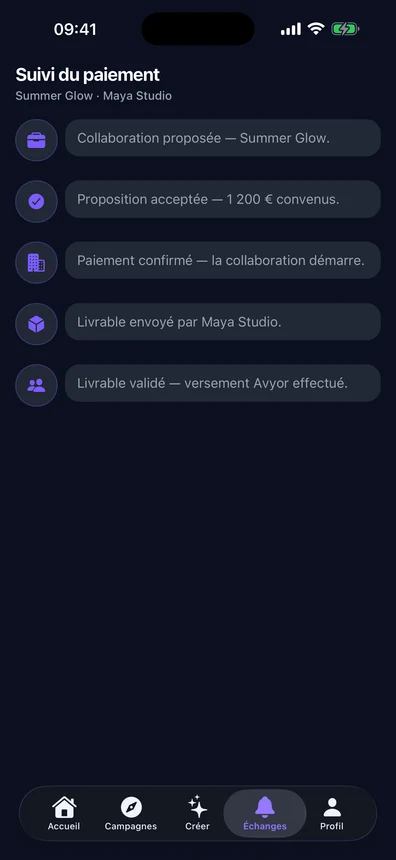
AVYOR screens · Demonstration data. Profiles, amounts and statistics are illustrative.
Your account.
Authentication and sensitive changes go through Supabase. From the security settings you can change your password — with a strength indicator —, change your email address with verification by message, and review the sessions you are signed in on.
Deleting your account.
Deletion happens from Settings, then Security. The action is irreversible and asks for an explicit written confirmation before it runs. Finish any ongoing collaborations first: some records tied to a payment have to be kept for legal reasons.
What your profile shows.
Profile, videos and portfolio are meant to be seen: that is what the product is for. Conversations, on the other hand, are only visible to the people in them. Your notification and display preferences are set in the app.
The payment is held until approval.
Once the offer is accepted, the brand pays and the money is held by AVYOR. It is only released to the Creator once the deliverable is approved. Neither the Creator nor the brand holds the funds in the meantime.
The payout, stage by stage.
Four states are shown: collaboration paid, deliverable approved, transfer to the Stripe balance, bank transfer. The timing of the last one depends on the payout schedule of the Creator’s Stripe account; no timeframe is promised.
Reporting content or an account.
Reporting is available from a video, a conversation or a profile, with a reason to specify.
- Spam, fake account or impersonation.
- Harassment, violence, unsolicited sexual content.
- Fraud or copyright infringement.
- Another reason, with a free comment.
Blocking a user.
Blocking happens in the same place as reporting and stops the interaction. It can be undone from your settings.
A problem during a collaboration?
Contact support and say which project it concerns. Never send passwords or full bank details by email. For abusive content or behaviour, use the report in the app: it reaches the team directly.